Introduction
Ever stumbled upon a TikTok profile with an amazing profile picture that you wanted to save for inspiration, reference, or creative projects? You’re not alone. Thousands of users search daily for ways to download TikTok profile pictures, but the platform doesn’t offer a built in option to save these images directly.
Whether you’re a content creator looking to analyze competitor branding, a designer seeking inspiration, or simply want to save a friend’s profile picture, learning how to use a TikTok PFP downloader can save you time and frustration. The challenge? Most methods result in low resolution, pixelated images that are practically useless.
In this comprehensive guide, you’ll discover 5 proven methods to download TikTok profile pictures in HD quality, understand the legal considerations, explore the best tools available, and learn step by step processes that work in 2024. We’ll also cover common mistakes to avoid and answer the most frequently asked questions about TikTok profile picture downloading.
Quick Answer: Best Way to Download TikTok PFP
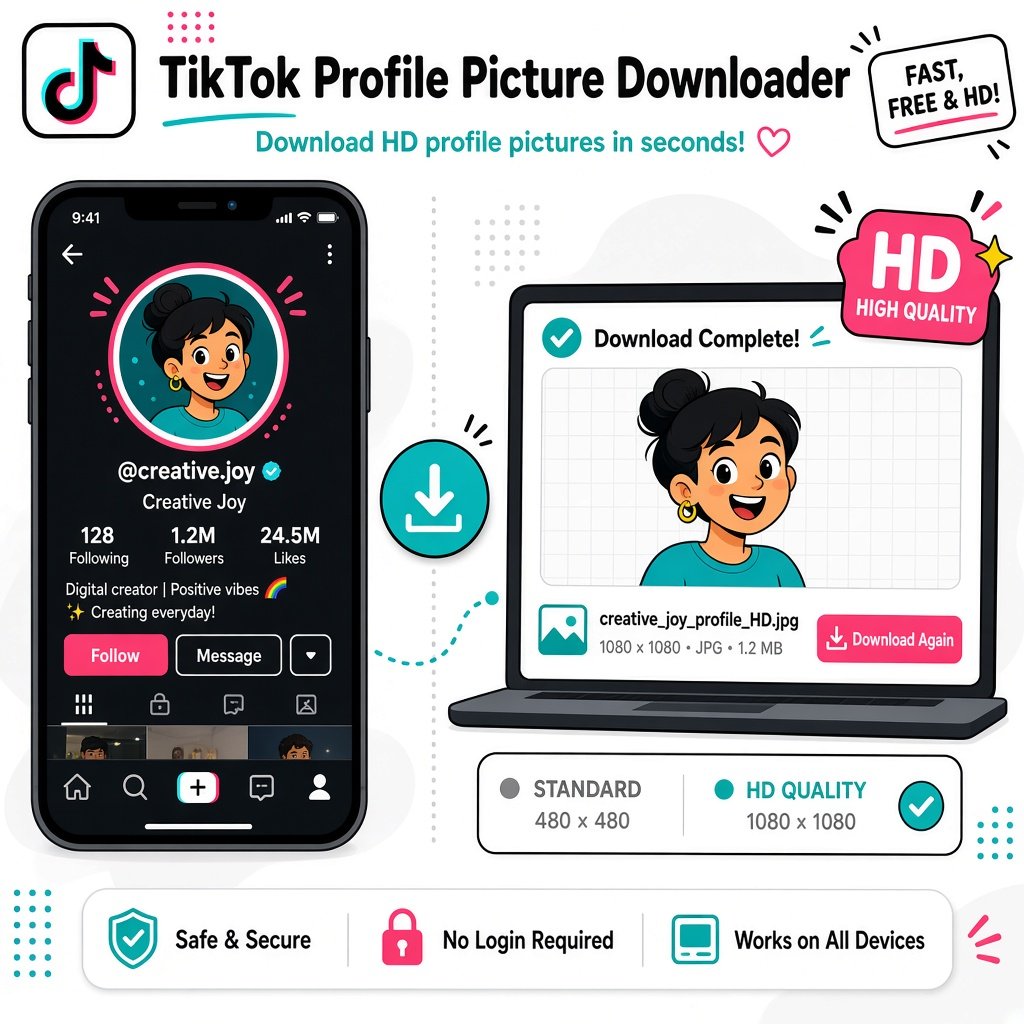
The fastest method to download a TikTok profile picture in HD is using a dedicated TikTok PFP downloader tool. Here’s the quick process:
Key Takeaways:
Copy the TikTok username or profile URL
Paste it into a TikTok Profile picture downloader like BGImageSnap
Download the image in HD quality (up to 1080×1080 pixels)
No app installation required works directly in your browser
100% free for most reputable tools
Works on all devices iPhone, Android, PC, Mac
Average time: Less than 30 seconds
Image quality: Up to full HD resolution
Cost: Free
What is a TikTok PFP and Why Download It?
Understanding TikTok Profile picture
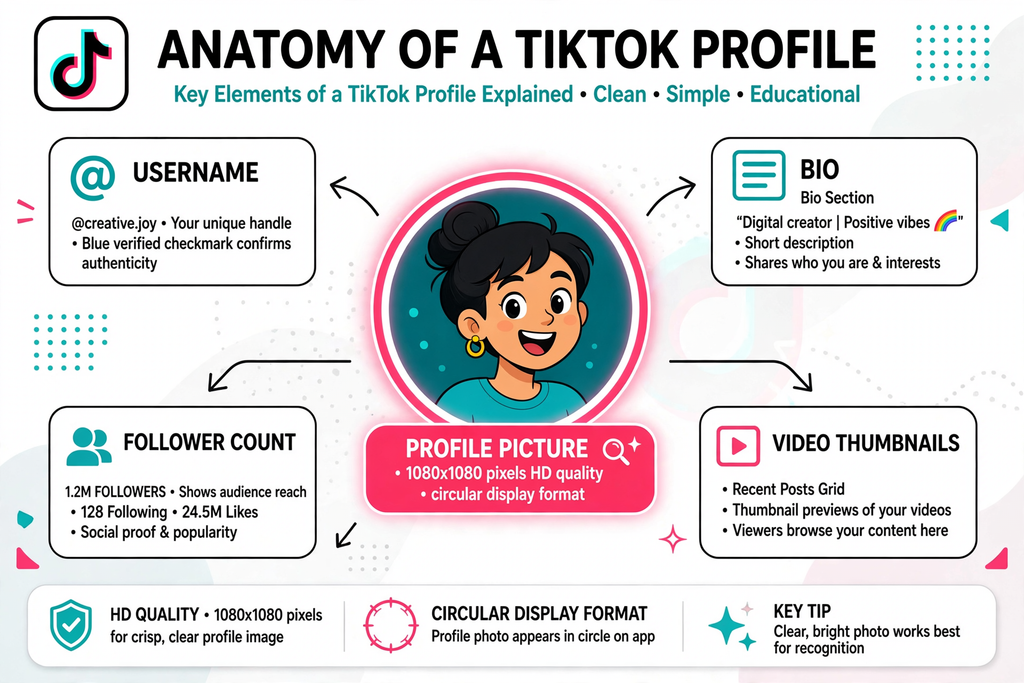
PFP stands for “Profile Picture” – the circular image that represents a TikTok user’s account. This image appears next to every comment, video, and interaction the user makes on the platform. TikTok profile pictures are typically square images (usually 200×200 to 1080×1080 pixels) that get cropped into a circular format for display.
Why People Download TikTok Profile Pictures
Content Creators:
- Analyze competitor branding strategies
- Create collaboration graphics
- Study visual trends in their niche
Designers & Marketers:
- Build case studies
- Create presentation materials
- Conduct brand analysis
Personal Use:
- Save memories of friends’ profiles
- Use as inspiration for own profile pictures
- Reference for artistic projects
Businesses:
- Monitor influencer partnerships
- Track brand ambassadors
- Create marketing reports
5 Proven Methods to Download TikTok Profile Pictures
Method 1: Using Online TikTok PFP Downloader Tools (Recommended)
Best for: Quick, high quality downloads without software installation
Online tools like BGImageSnap provide the easiest way to download TikTok profile pictures in full HD resolution. These web based services work directly in your browser without requiring any downloads or registrations.
Advantages:
- No software installation needed
- Works on all devices and operating systems
- Usually provides HD quality images
- Fast and user friendly
- Free to use
Limitations:
- Requires internet connection
- Some tools may have ads
Method 2: Screenshot and Crop (Basic Method)
Best for: Emergency situations when no tools are available
This manual method involves taking a screenshot of the profile and cropping the image.
Advantages:
- Works offline
- No third party tools needed
- Universal method
Limitations:
- Lower image quality
- Time consuming
- Requires manual editing
- Results in compressed images
Method 3: Browser Developer Tools (Advanced)
Best for: Tech savvy users who want maximum control
This method involves using browser inspection tools to locate the direct image URL.
Advantages:
- Direct access to source files
- No third party services
- Often provides highest available quality
Limitations:
- Requires technical knowledge
- Time consuming
- Not mobile friendly
- Can be complicated for beginners
Method 4: Mobile Apps (iOS/Android)
Best for: Users who frequently download profile pictures
Several mobile applications specialize in downloading TikTok content, including profile pictures.
Advantages:
- Convenient on mobile devices
- Often includes batch download features
- May offer additional TikTok tools
Limitations:
- Requires app installation
- Some apps contain intrusive ads
- Privacy concerns with some apps
- Storage space required
Method 5: TikTok Profile Picture Downloader Browser Extensions
Best for: Regular users who need quick access
Browser extensions integrate directly into your browsing experience.
Advantages:
- One click convenience
- Fast access
- Works while browsing TikTok
Limitations:
- Only works on desktop browsers
- Requires installation
- May slow down browser
- Potential security risks with unknown extensions
How to Use BGImageSnap’s TikTok PFP Downloader
BGImageSnap offers a streamlined, user friendly TikTok profile picture downloader that delivers HD quality images in seconds.
Features of BGImageSnap TikTok PFP Downloader:
- 100% Free No hidden costs or subscriptions
- HD Quality Download up to 1080×1080 resolution
- No Registration Start downloading immediately
- All Devices Works on desktop, mobile, and tablet
- Fast Processing Get your image in under 10 seconds
- Privacy Focused No data storage or tracking
- Clean Interface No intrusive ads or pop ups
Why Choose BGImageSnap?
BGImageSnap specializes in image downloading tools with a focus on quality and user experience. Unlike many competitors that compromise on image resolution or bombard users with advertisements, BGImageSnap maintains a clean, efficient service that prioritizes your needs.
Step-by-Step: Downloading TikTok Profile Pictures on Different Devices
How to Download TikTok PFP on iPhone/iPad
Step 1: Open the TikTok app on your iPhone or iPad
Step 2: Navigate to the profile whose picture you want to download
Step 3: Tap the three dot menu icon and select “Copy Link” or simply copy the username
Step 4: Open Safari or your preferred browser and visit BGImageSnap.com
Step 5: Paste the username or link into the TikTok PFP downloader input field
Step 6: Tap the “Download” button
Step 7: The HD profile picture will appear – tap and hold the image
Step 8: Select “Add to Photos” or “Save Image” from the menu
Time Required: 30,45 seconds
How to Download TikTok PFP on Android Devices
Step 1: Launch the TikTok app on your Android phone or tablet
Step 2: Go to the target profile
Step 3: Tap “Share” and select “Copy Link” (or copy the @username)
Step 4: Open Chrome, Firefox, or your default browser
Step 5: Navigate to https://bgimagesnap.com/
Step 6: Paste the link or username into the TikTok profile picture downloader tool
Step 7: Click “Download PFP”
Step 8: Long press the displayed image and choose “Download image”
Time Required: 30-45 seconds
How to Download TikTok PFP on PC/Mac (Desktop)
Step 1: Open TikTok in your web browser (or use the desktop app)
Step 2: Navigate to the profile page of the user
Step 3: Copy the profile URL from the address bar or copy the username
Step 4: Open a new tab and visit BGImageSnap’s TikTok Profile picture downloader
Step 5: Paste the URL or username into the input field
Step 6: Click “Download Profile Picture”
Step 7: Right click the displayed HD image
Step 8: Select “Save image as…” and choose your download location
Time Required: 20-30 seconds
Using Browser Developer Tools (Advanced Method)
For those comfortable with technical approaches:
Step 1: Open TikTok in Chrome, Firefox, or Edge
Step 2: Navigate to the profile page
Step 3: Right click the profile picture and select “Inspect” or “Inspect Element”
Step 4: In the developer console, locate the <img> tag containing the profile picture
Step 5: Find the src attribute – this contains the image URL
Step 6: Copy the full URL (look for the highest resolution version)
Step 7: Paste the URL in a new browser tab
Step 8: Right click and save the image
Time Required: 1-2 minutes (for experienced users)
Understanding Image Quality: SD vs HD Downloads
What Determines TikTok Profile Picture Quality?
TikTok stores multiple versions of each profile picture:
- Thumbnail version: 100×100 pixels (low quality)
- Standard version: 200×200 pixels (medium quality)
- HD version: 720×720 to 1080×1080 pixels (high quality)
Why Quality Matters
| Use Case | Minimum Recommended Resolution |
|---|---|
| Social media sharing | 200×200 pixels |
| Printing | 720×720 pixels minimum |
| Professional presentations | 1080×1080 pixels |
| Digital displays | 720×720 pixels |
| Web thumbnails | 200×200 pixels |
How to Ensure Maximum Quality
- Use dedicated downloader tools rather than screenshots
- Choose services that specifically advertise HD downloads like BGImageSnap
- Avoid compressing the image after download
- Save in PNG format when possible for better quality retention
- Check the file size larger files typically indicate better quality
Legal and Ethical Considerations
Is It Legal to Download TikTok Profile Pictures?
Short answer: It depends on how you use the downloaded image.
Legal Perspective:
Permitted Uses:
- Personal reference and inspiration
- Educational purposes
- Analysis and research
- Fair use commentary and criticism
Prohibited Uses:
- Impersonating the profile owner
- Commercial use without permission
- Creating fake accounts with someone else’s image
- Harassment or defamation
- Redistribution claiming ownership
TikTok’s Terms of Service
TikTok’s Community Guidelines and Terms of Service prohibit:
- Impersonation
- Unauthorized use of intellectual property
- Creating misleading content using others’ identities
Best Practices for Ethical Use:
Ask for permission when using for commercial purposes
Give proper credit when sharing or referencing
Respect privacy and personal boundaries
Use responsibly and within legal frameworks
Avoid impersonation under all circumstances
Copyright Considerations:
Profile pictures may be protected by copyright, even if publicly accessible. The creator of the image (not necessarily the TikTok user) holds the copyright. Always respect intellectual property rights.
Common Mistakes to Avoid When Downloading TikTok PFP
Mistake #1: Using Screenshot Only Methods
Why it’s problematic:
- Results in significantly lower quality
- Captures unnecessary elements
- Requires additional editing
- Wastes time
Better approach: Use a dedicated TikTok Profile picture downloader tool for clean, high resolution images.
Mistake #2: Downloading from Untrusted Websites
Risks include:
- Malware and virus infections
- Privacy breaches
- Data theft
- Poor quality downloads
- Intrusive advertising
Solution: Stick to reputable services like BGImageSnap with verified security and privacy practices.
Mistake #3: Installing Unnecessary Software
Problems:
- Takes up device storage
- May contain adware or spyware
- Often requires permissions that compromise privacy
- Updates and maintenance burden
Better option: Use web based tools that require no installation.
Mistake #4: Ignoring Image Resolution
Consequences:
- Unusable for printing
- Pixelated appearance when enlarged
- Unprofessional results
- Wasted effort if quality is insufficient
Prevention: Always verify the resolution before downloading and choose HD options.
Mistake #5: Violating Privacy and Copyright
Legal risks:
- Copyright infringement claims
- Terms of service violations
- Potential legal action
- Account suspension
- Reputation damage
Protection: Always use downloaded images ethically and within legal boundaries.
Mistake #6: Not Verifying the Username
Issues:
- Downloading wrong profile picture
- Wasting time
- Confusion in projects
Fix: Double check the username or profile URL before downloading.
Best TikTok Profile Picture Downloader Tools Comparison
Comprehensive Tool Comparison Table
| Tool | Quality | Speed | Device Support | Cost | Ease of Use | Privacy | Rating |
|---|---|---|---|---|---|---|---|
| BGImageSnap | HD (1080p) | Very Fast | All | Free | Excellent | High | ⭐⭐⭐⭐⭐ |
| Generic Web Tool A | SD-HD | Fast | All | Free with ads | Good | Medium | ⭐⭐⭐⭐ |
| Mobile App B | HD | Medium | Mobile only | Freemium | Fair | Low | ⭐⭐⭐ |
| Browser Extension C | HD | Fast | Desktop only | Free | Good | Medium | ⭐⭐⭐⭐ |
| Screenshot Method | Low | Slow | All | Free | Poor | High | ⭐⭐ |
Why BGImageSnap Stands Out
Superior Quality:
BGImageSnap consistently delivers the highest available resolution, ensuring your downloaded TikTok profile pictures are crisp and clear.
No Compromises:
Unlike competitors that trade user experience for ad revenue, BGImageSnap maintains a clean, distraction free interface.
Universal Compatibility:
Works seamlessly across all devices and operating systems without requiring downloads or registrations.
Privacy First:
No data collection, no tracking, and no storage of your download history.
Frequently Asked Questions
1. Can I download TikTok profile pictures without the user knowing?
Yes, downloading a TikTok profile picture is a passive action that doesn’t notify the user. However, remember to use downloaded images ethically and respect privacy. The profile owner won’t receive any notification when you download their picture using a TikTok Profile picture downloader tool.
2. What is the maximum resolution for TikTok profile pictures?
TikTok profile pictures are typically stored at a maximum resolution of 1080×1080 pixels. However, the displayed version is often smaller (around 200×200 pixels). Using a quality TikTok Profile picture downloader like BGImageSnap ensures you get the highest available resolution, which is usually 720×720 to 1080×1080 pixels depending on what the user originally uploaded.
3. Do I need to create an account to download TikTok profile pictures?
No, reputable TikTok profile picture downloader tools like BGImageSnap don’t require account creation or registration. You can simply paste the username or profile link and download immediately. Avoid services that demand registration, as this is often unnecessary and may be a data collection tactic.
4. Can I download private TikTok account profile pictures?
Generally, no. If an account is set to private, most TikTok PFP downloader tools cannot access the profile picture unless you’re an approved follower. Some tools may work if you’re logged into TikTok and have access to view the private profile, but this varies by tool and TikTok’s privacy settings.
5. Is using a TikTok profile picture downloader against TikTok’s rules?
Using a TikTok PFP downloader to save profile pictures for personal reference isn’t explicitly prohibited, but using downloaded images to impersonate others, create fake accounts, or violate copyright is against TikTok’s Terms of Service. Always use downloaded content responsibly and within legal parameters.
6. Why are some downloaded TikTok profile pictures blurry?
Blurry images typically result from:
Using screenshot methods instead of proper downloaders
The original uploaded image being low resolution
Using a poor quality downloader tool
Downloading a thumbnail version instead of the full size image
Solution: Use a reliable TikTok PFP downloader like BGImageSnap that specifically retrieves the HD version.
7. Can I download multiple TikTok profile pictures at once?
Most basic online TikTok profile picture downloader tools process one image at a time. Some premium services or dedicated software may offer batch downloading features, but for occasional use, single downloads through BGImageSnap are typically sufficient and faster.
8. How do I find someone’s TikTok username if I only have their video?
Navigate to the video on TikTok, and the username will be displayed at the top of the screen or in the video caption. The username always starts with “@” symbol. You can copy this username and paste it directly into a TikTok PFP downloader tool.
Conclusion
Downloading TikTok profile pictures in HD quality doesn’t have to be complicated or risky. With the right TikTok PFP downloader tool, you can save high resolution profile images in seconds without installing software, creating accounts, or compromising your privacy.
Throughout this guide, we’ve explored five proven methods for downloading TikTok profile pictures, with online tools like BGImageSnap emerging as the clear winner for speed, quality, and user experience. Whether you’re a content creator analyzing competitor branding, a designer seeking inspiration, or simply wanting to save a memorable profile picture, the process is straightforward when you use the right approach.