Buying a console, waiting for downloads, and filling a hard drive used to be the only way to play big Xbox titles. Xbox Cloud Gaming streams those games from Microsoft’s servers to a phone, tablet, PC, or TV, so you play without installing the full game on your device. In this guide, you’ll learn how Xbox Cloud Gaming works what internet you need, and how to start a session in a few taps.
Key Takeaways
- Xbox Cloud Gaming runs games on remote Xbox Series X hardware and sends the video to your screen.
- You need Xbox Game Pass Ultimate and a supported browser, app, or smart TV.
- A stable connection of about 10 Mbps is the usual minimum; 20 Mbps or more looks smoother.
- Your controller (or touch controls) sends inputs back to the cloud with as little delay as possible.
- Capture stills and covers for posts, then crop them free at bgimagesnap.
What Is Xbox Cloud Gaming and How Does It Work?
Xbox Cloud Gaming (often called xCloud) is Microsoft’s game streaming service. The game does not fully install on your phone or laptop. It runs in a data center, and you watch a live video of that session.
Here is the loop. You pick a title from the cloud library. Microsoft assigns a blade of Xbox Series X hardware in a nearby region. That machine loads the game, renders each frame, compresses the picture, and streams it to you over the internet.
Your button presses travel the other way. The controller or touch pad sends inputs to the server, the game reacts, and a new frame comes back. If the network is fast and close, this feels close to playing on a real console.
Compression is the trade off. Xbox Cloud Gaming must shrink video in real time, so busy scenes can look slightly softer than a local disc. A wired or strong Wi-Fi link hides most of that.
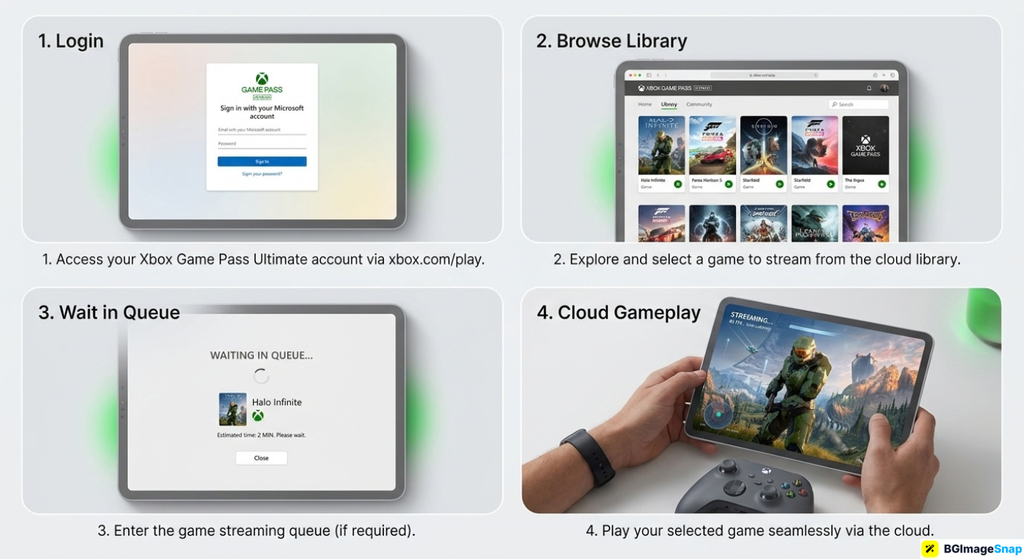
Not every Game Pass game is in the cloud list, and popular hours can mean a short queue. When a slot opens, play continues from the cloud save tied to your Xbox account.
Xbox Cloud Gaming Devices Specs and Limits
This breakdown covers what Xbox Cloud Gaming needs and what you can expect on a good night.
What you need to sign in
- An Xbox account
- Xbox Game Pass Ultimate (cloud play is tied to this plan)
- The Xbox app or a supported browser at xbox.com/play
- A Microsoft region where the service is offered
Where you can play
- Windows PC in Edge, Chrome, or the Xbox app
- Android phones and tablets via the Xbox app
- iPhone and iPad in a supported browser (Safari) or the Xbox app where available
- Select smart TVs, streaming sticks, and Amazon Fire TV
- Some Xbox consoles can use cloud titles alongside local installs
How the stream is built
- Games run on Xbox Series X cloud hardware
- Video is encoded (compressed) and sent as a live stream
- Audio rides along with the picture
- Your inputs go back as small network packets
- Saves sync to the cloud on your Xbox profile
Internet and performance targets
- About 10 Mbps is often cited as a minimum
- 20 Mbps or more is more comfortable for a stable 1080p class stream
- Low latency (ping) matters as much as download speed
- 5 GHz Wi-Fi or ethernet beats crowded 2.4 GHz Wi-Fi
- Play close to a Microsoft streaming region when you can
Controllers and touch
- Official Xbox Wireless Controller (Bluetooth on many phones)
- Many other Bluetooth gamepads work, quality varies
- On screen touch controls for some games
- Keyboard and mouse on PC for supported titles
- Headsets for in game chat where the title allows it
Library and session rules
- A subset of Game Pass games, not the entire catalog
- New cloud titles appear over time; others rotate
- Sessions can time out if you leave the game idle
- Queues appear when servers are busy
- Resolution and frame rate depend on device and connection (often up to 1080p/60 when conditions allow)
What Xbox Cloud Gaming is not
- Not a replacement for every local Series X feature
- Not guaranteed 4K on every phone
- Not offline play no internet means no stream
- Not a free add on on Game Pass Core or PC only plans
The big idea: Xbox Cloud Gaming is remote play on Microsoft’s hardware. Your gadget is a screen and a controller, not the computer doing the heavy graphics.
How to Start Xbox Cloud Gaming Step by Step
You can be in a game in minutes if your plan and Wi-Fi are ready.
- Confirm Game Pass Ultimate. Cloud streaming is included with Ultimate, not every Xbox subscription. Check subscriptions in your Microsoft account before you hunt for a missing Play button.
- Open a supported app or browser. On Android, use the Xbox app. On many PCs, go to xbox.com/play in Edge or Chrome. On iOS, use the supported Xbox experience in the browser or app for your region.
- Plug in a controller if you can. Pair an Xbox pad over Bluetooth, or use a USB cable on PC. Touch works in a pinch, but Xbox Cloud Gaming feels better with real buttons.
- Pick a cloud enabled game and wait for the slot. Titles marked for cloud show a play from cloud option. If you see a queue, keep the screen awake until the stream starts.
- Test picture and input, then play. If the image stutters, pause other downloads, move closer to Wi-Fi, or lower other traffic on the network. After your session, grab screenshots and crop them for social posts at bgimagesnap.
The first session is the slowest because you are learning menus. After that, Xbox Cloud Gaming is mostly “choose game, wait for server, play.”
Who Uses Xbox Cloud Gaming? Real Use Cases
Students in small rooms. A dorm laptop or phone can run huge games without a console under the bed. Xbox Cloud Gaming keeps noise and heat off the desk during late study breaks.
Travelers and commuters. Hotel Wi-Fi is hit or miss, but when it is decent, a controller in a backpack is enough. You pick up the same Xbox saves you left at home.
Families sharing one TV. Someone else has the living room console. A tablet on Xbox Cloud Gaming lets a second person play a Game Pass title in another room.
PC players without a gaming rig. A work safe laptop can still stream Xbox Cloud Gaming in a browser after hours, as long as the network is stable and the plan is Ultimate.
Tips for Smoother Xbox Cloud Gaming
- Use 5 GHz Wi-Fi or a cable. Streaming hates interference from microwaves and crowded apartment routers.
- Pause big downloads. Cloud updates and Netflix on the same Wi-Fi steal the bitrate Xbox Cloud Gaming needs.
- Sit closer to the router. Phones in a far bedroom add delay you will feel in fighting games.
- Keep the controller charged. Bluetooth dropouts feel like “the cloud is laggy” when the pad is dying.
- Close extra browser tabs. They eat CPU while the stream is decoding video.
- Play off peak if you always queue. Evenings and launch weeks fill Xbox Cloud Gaming servers first.
- Lower motion blur expectations on cellular. Phone hotspots can work, but home Wi-Fi is the safer default.
Frequently Asked Questions
Do I need an Xbox console for Xbox Cloud Gaming?
No. The game runs on Microsoft’s Xbox Series X servers. You need Game Pass Ultimate and a supported device.
Is Xbox Cloud Gaming free?
Not by itself. It comes with Xbox Game Pass Ultimate. Other Game Pass tiers do not always include cloud play.
Why is there input lag?
Your presses travel to the data center and the video travels back. Distance, Wi-Fi, and compression all add delay. A nearby region and a strong network keep Xbox Cloud Gaming feeling tight.
Can I play every Game Pass game in the cloud?
No. Only titles Microsoft enables for streaming. Check the cloud filter in the app or on xbox.com/play.
Does Xbox Cloud Gaming work on iPhone?
In supported regions, yes, through the allowed browser or app path. Apple’s rules have changed over time, so use the official Xbox instructions for your country.
Conclusion
Xbox Cloud Gaming turns a phone or laptop into a window onto Series X hardware in the cloud, as long as Ultimate and your internet hold up. Know the bitrate, grab a real controller, and the stream feels close to a console without the install wait. When you share clips and stills from a session, visit bgimagesnap to crop, resize, and clean screenshots with free browser tools!