Introduction
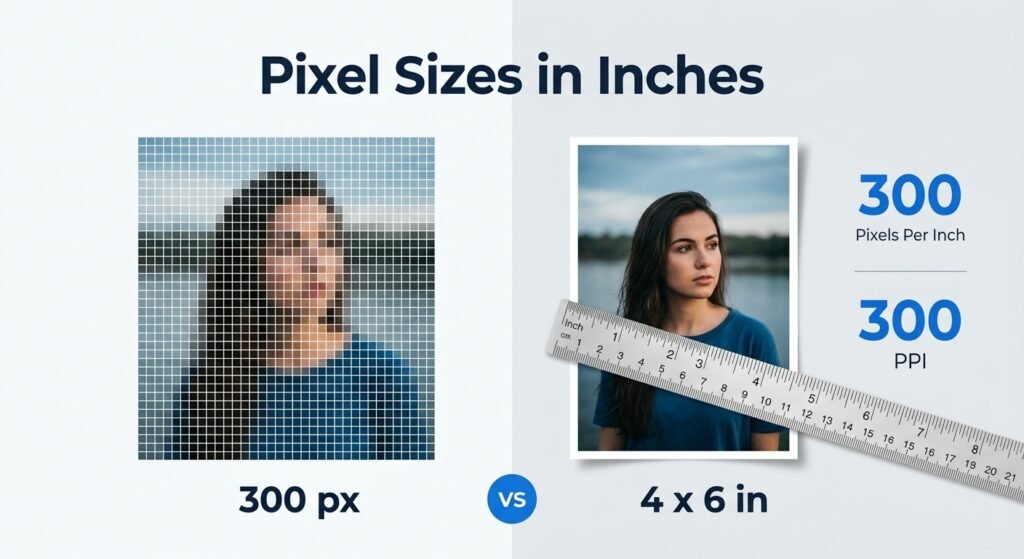
Understanding pixel sizes in inches can be confusing because pixels and inches measure different things. Pixels describe the digital dimensions of an image while inches describe its physical size when printed or displayed at a specific resolution. The good news is that converting between them is straightforward once you understand PPI (pixels per inch). Whether you are preparing a passport photo printing a family picture designing marketing material or resizing an image for a professional project knowing the relationship between pixels and inches helps you avoid blurry or incorrectly sized results.
In this guide you will learn how pixel sizes in inches are calculated see common conversion examples understand PPI and learn how to choose the right dimensions for digital and print projects.
Quick Answer: How Do Pixel Sizes in Inches Work?
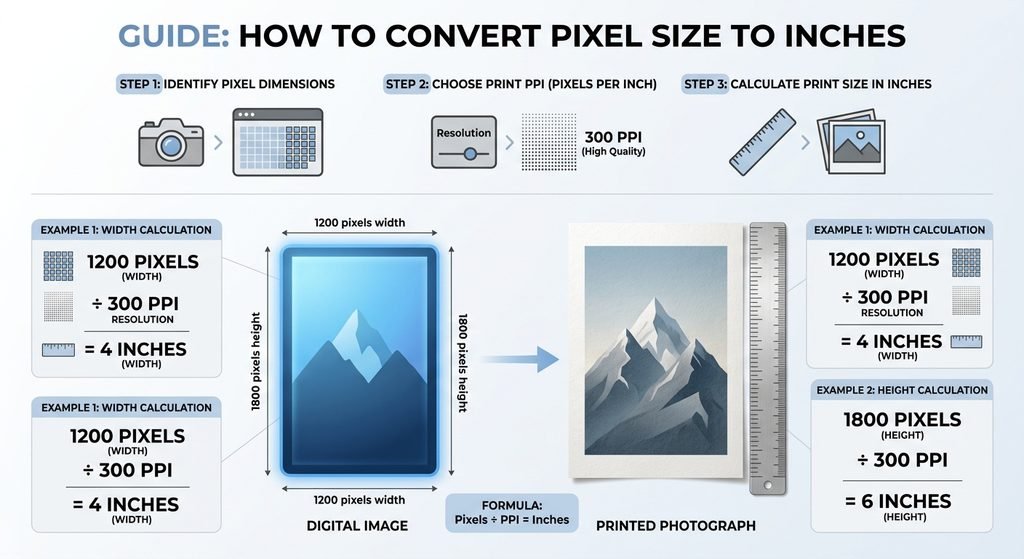
To calculate inches from pixels use this formula:
Inches = Pixels ÷ PPI
For example, an image that is 1200 pixels wide at 300 PPI has a physical width of:
1200 ÷ 300 = 4 inches
This means the same 1200 pixel image could represent different physical sizes depending on its PPI setting. For example:
| Pixels | At 72 PPI | At 150 PPI | At 300 PPI |
|---|---|---|---|
| 300 px | 4.17 in | 2 in | 1 in |
| 600 px | 8.33 in | 4 in | 2 in |
| 900 px | 12.5 in | 6 in | 3 in |
| 1200 px | 16.67 in | 8 in | 4 in |
| 1500 px | 20.83 in | 10 in | 5 in |
| 1800 px | 25 in | 12 in | 6 in |
| 2400 px | 33.33 in | 16 in | 8 in |
| 3000 px | 41.67 in | 20 in | 10 in |
The important point is that pixels alone do not determine physical size. You also need the PPI value.
What Are Pixel Sizes in Inches?
Pixel sizes in inches describe the physical dimensions an image will have when a specific pixel count is printed or rendered at a certain resolution. A pixel is a tiny unit used to represent digital images. An inch is a physical measurement. They become directly related through PPI.
For example:
- 600 pixels at 300 PPI = 2 inches
- 1200 pixels at 300 PPI = 4 inches
- 1800 pixels at 300 PPI = 6 inches
- 2400 pixels at 300 PPI = 8 inches
This is especially important for printing because an image can have plenty of pixels but still be printed at different physical sizes.
How to Convert Pixel Sizes in Inches
The basic formula is simple:
Pixel width ÷ PPI = width in inches
And for height:
Pixel height ÷ PPI = height in inches
Example: 1200 × 1800 Pixels
Suppose you have a portrait image measuring 1200 × 1800 pixels and want to print it at 300 PPI.
Width:
1200 ÷ 300 = 4 inches
Height:
1800 ÷ 300 = 6 inches
So the physical print size is:
4 × 6 inches
This is a common example of how a digital image can be translated into a real world print dimension.
Pixel Sizes in Inches Conversion Chart
Here are more examples to make conversions easier:
| Digital Image | 150 PPI | 200 PPI | 300 PPI |
| 300 × 300 px | 2 × 2 in | 1.5 × 1.5 in | 1 × 1 in |
| 600 × 600 px | 4 × 4 in | 3 × 3 in | 2 × 2 in |
| 900 × 1200 px | 6 × 8 in | 4.5 × 6 in | 3 × 4 in |
| 1200 × 1800 px | 8 × 12 in | 6 × 9 in | 4 × 6 in |
| 1500 × 2100 px | 10 × 14 in | 7.5 × 10.5 in | 5 × 7 in |
| 2400 × 3000 px | 16 × 20 in | 12 × 15 in | 8 × 10 in |
These are mathematical conversions based on the stated PPI. Your actual print quality can also depend on the printer, image quality paper and viewing distance.
Why Does PPI Matter?
PPI stands for pixels per inch. It indicates how many pixels are assigned to each inch of physical output. A higher PPI generally places more image detail into a smaller physical area. A lower PPI spreads the same number of pixels over a larger physical area.
For example, a 2400 pixel wide image can be:
- 8 inches wide at 300 PPI
- 12 inches wide at 200 PPI
- 16 inches wide at 150 PPI
The pixel count stays the same but the physical size changes. This is why simply saying that an image is “2400 pixels” is incomplete when discussing printing.
Common Pixel to Inch Examples
600 Pixels in Inches
At 300 PPI:
600 ÷ 300 = 2 inches
At 150 PPI:
600 ÷ 150 = 4 inches
1200 Pixels in Inches
At 300 PPI:
1200 ÷ 300 = 4 inches
At 200 PPI:
1200 ÷ 200 = 6 inches
At 150 PPI:
1200 ÷ 150 = 8 inches
2400 Pixels in Inches
At 300 PPI:
2400 ÷ 300 = 8 inches
At 200 PPI:
2400 ÷ 200 = 12 inches
At 150 PPI:
2400 ÷ 150 = 16 inches
These examples show why the PPI value should always be included when someone asks for pixel sizes in inches.
Pixels vs. Inches: Which Measurement Should You Use?
The right measurement depends on what you are doing.
| Use Case | Best Measurement |
| Website images | Pixels |
| Social media graphics | Pixels |
| Mobile and desktop graphics | Pixels |
| Photo printing | Inches + PPI |
| Posters | Inches + PPI |
| Physical marketing materials | Inches + PPI |
| Digital screen layouts | Pixels |
For online content designers normally work with pixel dimensions because screens display digital pixels directly. For printed materials physical measurements such as inches become more useful together with a suitable resolution.
How to Check and Change Image Size
You can usually check image dimensions through your image editor or operating system.
Step 1: Check the pixel dimensions
Look for the image’s width and height such as:
1920 × 1080 pixels
Step 2: Check the PPI or resolution setting
Depending on the software this may appear under image size properties, resize, or print settings.
Step 3: Calculate the physical dimensions
Use:
Width in inches = pixel width ÷ PPI
Height in inches = pixel height ÷ PPI
Step 4: Decide whether you need resizing
If your physical dimensions are not suitable you may need to resize the image. Avoid enlarging a low resolution photo more than necessary because increasing dimensions cannot automatically recreate missing original detail. For quick image adjustments you can also use BGImageSnap to work with your images before preparing them for your final use.
Common Mistakes When Converting Pixels to Inches
1. Assuming Pixels Always Equal a Fixed Number of Inches
They do not. The conversion depends on PPI.
2. Ignoring the Image’s Aspect Ratio
Changing width and height independently can stretch or distort a photo.
3. Confusing DPI and PPI
PPI describes image pixels per inch while DPI is commonly associated with printer output. The terms are often used interchangeably in everyday image discussions but they are not technically identical.
4. Enlarging Small Images Too Much
Making a small image much larger can reduce visible quality. Starting with sufficient original resolution is usually better.
5. Using Print Measurements for Web Images
A website generally cares about pixel dimensions rather than a physical inch measurement.
Visual Opportunities
A useful visual for this article would be a pixel to inch infographic showing:
Pixels → PPI → Inches
A second graphic could show the same image at 150, 200 and 300 PPI to demonstrate how physical dimensions change. A short screen recording video showing how to check image dimensions in a common image editor would also improve usability.
FAQs
How many pixels are in 1 inch?
There is no single answer because it depends on PPI. At 300 PPI 1 inch corresponds to 300 pixels.
What is 3000 pixels in inches?
At 300 PPI 3000 pixels equals 10 inches. At 150 PPI it equals 20 inches.
Is 1 inch always 96 pixels?
No. A 96 pixel per inch value may be used in certain digital or software contexts but image to inch conversion for printing depends on the PPI you specify.
What pixel size is 4 × 6 inches?
No. A 96 pixel per inch value may be used in certain digital or software contexts but image to inch conversion for printing depends on the PPI you specify.
Does changing PPI increase image quality?
Changing the PPI metadata alone does not create new image detail. Image quality depends heavily on the actual pixel dimensions and original image information.
Should I use pixels or inches for a website image?
Use pixels for most web images because digital layouts are defined by pixel dimensions and responsive display behavior.
Can I convert pixels to inches without PPI?
Not accurately. You need a PPI value to calculate a physical size in inches.
Conclusion
Understanding pixel sizes in inches becomes much easier once you remember one formula:
Inches = Pixels ÷ PPI
The same image can have different physical dimensions depending on its resolution setting. For digital content pixel dimensions are usually the most practical measurement. For printing combine the pixel dimensions with the required physical size and PPI. Before printing or resizing an important image check its width, height, aspect ratio and resolution. That simple step can help you avoid unexpected sizing and quality problems. For convenient image preparation and editing visit BGImageSnap and prepare your image before using it in your next digital or print project.