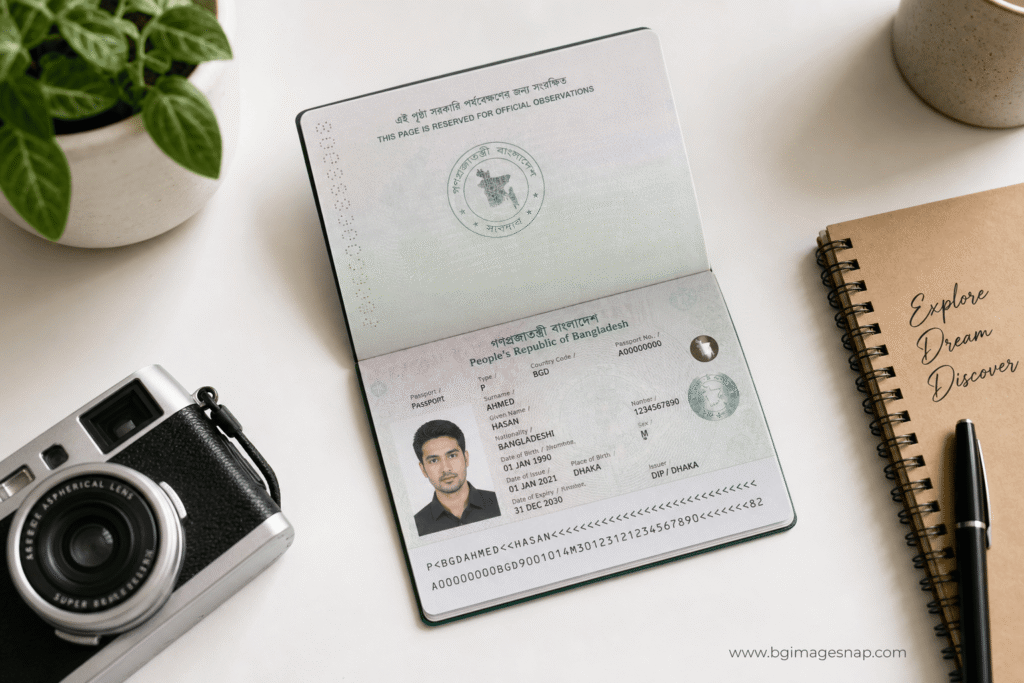
Passport Bio Page is the single most important sheet in your travel document. It carries your photo, full name, birth date, passport number, and expiration all the details immigration officers, banks, and online portals scan first. If you are applying for a visa, renewing travel documents, or uploading identity verification, knowing exactly what this page contains and how to capture it clearly can save you days of resubmission.
In this guide, you will learn what a Passport Bio Page is, where it sits inside US, UK, and Canadian passports, and how to photograph or scan it without glare, shadows, or cut-off corners.
Quick Answer / Key Takeaways
- A Passport Bio Page (also called the data page) contains your photo, name, birth date, nationality, passport number, and machine-readable zone.
- It is usually the first or second page inside your booklet, or the front of a card-style passport.
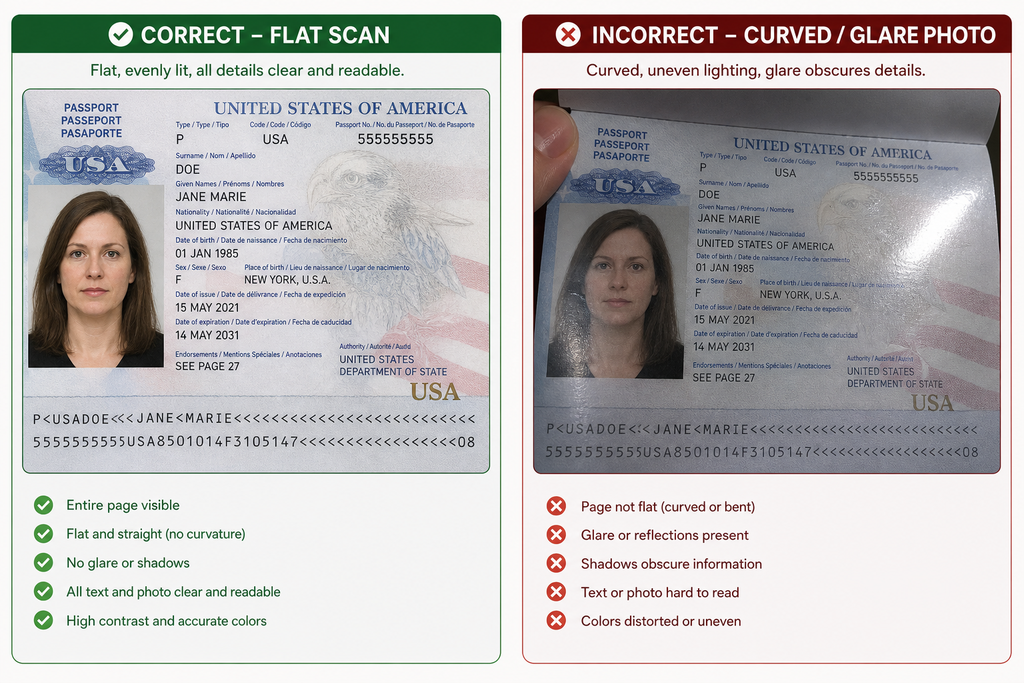
- For digital submissions, lay the page flat, use even daylight, and keep all four corners visible no fingers over text, no flash glare.
What Is a Passport Bio Page?
The Passport Bio Page is your identity anchor inside the booklet. It is not a visa page, not a stamps page, and not the decorative cover. It is the standardized data sheet issued by your government.
What it typically includes:
- Your passport photo
- Surname and given name
- Date and place of birth
- Sex/gender marker
- Nationality
- Passport number
- Issue date and expiration date
- Issuing authority
- Machine-Readable Zone (MRZ) at the bottom
Because this page relies on a machine-readable zone and precise typography, any distortion, glare, or missing corner can cause automated systems to reject your upload.
Is a Passport Bio Page the Same as a Data Page?
Yes. In official language, many governments call it the “data page,” but travelers often refer to it as the Passport Bio Page because it holds your biographical data. The term applies regardless of whether you hold a US large booklet, UK passport, or Canadian document.
Where to Find Your Passport Bio Page
Location depends slightly on your country and document style.
USA
- Large booklet: Page 2 (immediately inside the front cover).
- Passport Card: Printed on the front face of the plastic card.
UK
- Large booklet / Nano booklet: Inside the front cover (the first page after the cover sheet).
Canada
- Large booklet: Inside the front cover or page 2, depending on issue year.
If you are holding a current passport and cannot locate the Passport Bio Page quickly, check for the page with your photo and the long alphanumeric passport number this is always the correct sheet.
| Country | Document Type | Passport Bio Page Location |
|---|---|---|
| USA | Large Booklet | Page 2 (opposite cover) |
| USA | Passport Card | Front face of card |
| UK | Booklet / Nano | Inside front cover |
| Canada | Large Booklet | Inside front cover / Page 2 |
We recommend practicing once with your physical document so you can locate the Passport Bio Page quickly when an application timer is running.
How to Take a Clear Photo of Your Passport Bio Page
This is not about taking your portrait for a passport application this is about capturing the page itself for digital submission, backup storage, or verification.
How to Photograph a Passport Bio Page Without Glare
- Clean the surface: Wipe the laminate. Remove dust that creates dark spots.
- Use a flat surface: Lay the booklet open on a neutral desk or table. Do not hold it in your hand; curves create shadows and focus blur.
- Position the camera directly above: Hold your smartphone or camera parallel to the page. Avoid shooting at an angle, which can shorten the MRZ and distort text.
- Turn off the flash: Direct flash creates hot spots on laminated paper. Use ambient light instead.
- Frame the full page: Ensure all four corners are visible. Do not crop out the MRZ at the bottom.
Best Lighting for a Passport Bio Page Scan
Natural daylight near a window works best. If you must shoot indoors, place two lamps at roughly 45-degree angles from the page to eliminate shadows. Avoid overhead fluorescent lights that create yellow color casts.
Step-by-Step Capture Process
- Open the booklet to the Passport Bio Page.
- Place it flat with the data facing up.
- Set your camera to highest resolution; disable digital “beauty” filters that soften text.
- Use a timer or remote shutter to avoid hand shake.
- Take two shots: one tight crop to check focus, one full-page frame.
- Review at 100% zoom check that names and numbers are sharp.
- Save as PNG or high-quality JPEG; avoid heavy compression.
If you need a clean, uniform background for your digital copy, explore our background library at BG Image Snap for neutral, high-resolution templates.
Common Mistakes When Photographing Your Passport Bio Page
- Flash glare on laminate: This hides the MRZ and can cause rejection.
- Fingers over text: Even one finger covering a digit of your passport number invalidates the image for many portals.
- Cropping the expiration date: If the field is cut off, you must retake.
- Curved page: A curved page changes text spacing; flat is essential.
- Dark background: Some auto-crop tools confuse a black background with missing data.
Frequently Asked Questions
What is a Passport Bio Page exactly?
It is the data sheet in your passport containing your photo, name, birth details, passport number, and machine-readable zone.
Where is the Passport Bio Page located in a US passport?
For standard booklets, it is page 2 inside the front cover.
Can I submit a photo of my Passport Bio Page for visa applications?
Yes, many online visa systems ask for a copy of the bio page. Always verify whether they want a scan, a photo, or both.
What is the best lighting for a Passport Bio Page scan?
Even natural daylight near a window is best. Avoid direct flash and overhead yellow lighting.
How do I crop a Passport Bio Page correctly?
Keep a small white border, but never cut off the bottom MRZ or the top photo area. Include all four corners.
Is it safe to upload a Passport Bio Page to government websites?
Only upload to verified government portals (such as official visa or immigration sites). Avoid emailing copies over unsecured platforms.
Do UK passports have a Passport Bio Page on the inside cover?
Yes, in most UK passports the bio data page is the first page inside the front cover.
Why does my Passport Bio Page photo get rejected?
Common reasons include glare, blur, missing corners, cropped MRZ, or incorrect file size/format.
Conclusion
Your Passport Bio Page is more than a photo it is the legal identity proof inside your passport. Whether you are navigating a visa portal, renewing early, or building a secure digital backup, taking a clear, flat, evenly lit photo of this page is a simple skill that prevents major delays.
If you need clean, high-resolution backgrounds to standardize document scans or passport-related visuals, visit BG Image Snap for professional templates.
Need a clutter-free backdrop for your passport scans or ID templates? Browse the high-quality background collection at BGImageSnap and keep every detail sharp.