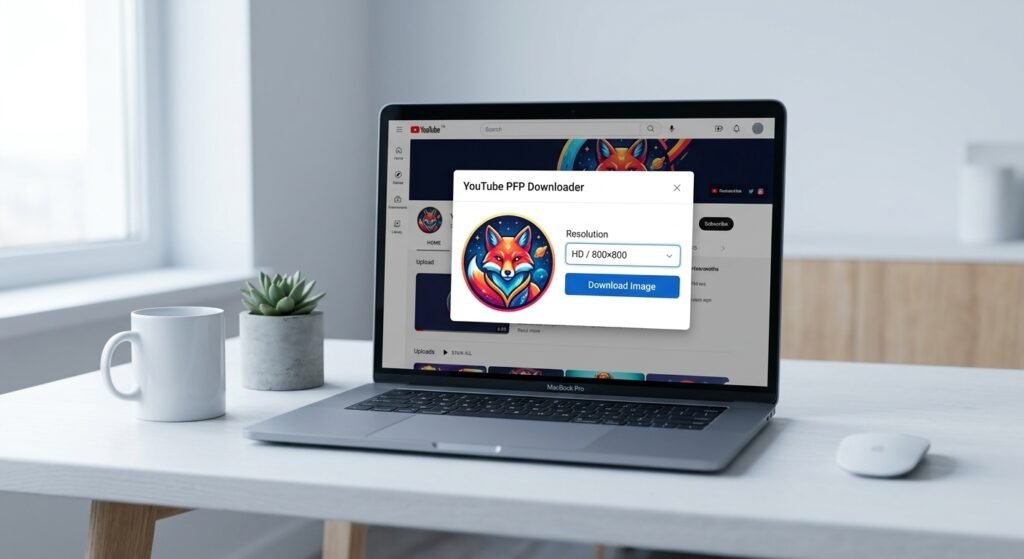
If you have ever tried to save a creator’s profile image from YouTube you already know the platform does not offer a direct “Save Image” button for avatars. That is exactly where a YouTube PFP Downloader becomes useful. Whether you want a high-quality wallpaper need to reference a channel’s branding or are curating visual assets for a creative project knowing how to download YouTube profile pictures in full resolution saves time and frustration.
In this guide you will learn exactly how a YouTube PFP Downloader works which methods actually deliver HD results and how to stay safe while doing it. We cover manual techniques web-based extractors and practical steps you can use today.
Quick Answer / Key Takeaways
- A YouTube PFP Downloader extracts the high resolution source file of a channel avatar not just a compressed thumbnail.
- Most reliable methods are browser based and do not require software installation.
- You can often recover images from 200px up to 800px+ by using the correct URL parameters inside a YouTube PFP Downloader.
- Always respect copyright and do not use downloaded avatars for commercial merchandise or ads without permission.
What Is a YouTube PFP Downloader?
A YouTube PFP Downloader is a tool or technique that lets you retrieve the original image file behind a YouTube channel’s profile picture. YouTube serves these avatars through Google’s content delivery network which means the image exists at a direct URL. A downloader either automates that retrieval or guides you to manipulate the URL to request a larger version.
This is different from taking a screenshot. A screenshot captures your screen resolution and adds compression artifacts. A proper YouTube PFP Downloader targets the source file which is why it can deliver sharp high definition results faster.
Can You Download YouTube Profile Pictures Without Tools?
Yes. Experienced users can locate the image URL within the page source or browser developer tools. Once you have the direct link you can sometimes change size parameters to request a larger format. However this requires comfort with web browsers and is not always intuitive for beginners.
Why Use a YouTube PFP Downloader for HD Images?
People seek HD YouTube profile pictures for several legitimate reasons. Content creators may need reference material for design mood boards. Marketers might collect brand assets for competitive analysis. Fans sometimes want a clearer version of a favorite creator’s avatar for personal wallpapers.
The key point is quality. YouTube compresses images for fast loading. If you rely on the small thumbnail shown on the channel page you miss detail. A YouTube PFP Downloader aims at the underlying file to recover that detail.
How to Use a YouTube PFP Downloader: Step-by-Step
If you prefer a direct approach follow these steps. They work for most web based extractors and manual methods.
- Open YouTube and navigate to the channel whose profile picture you need.
- Copy the channel URL from the address bar (for example,
youtube.com/@ChannelName). - Open your chosen YouTube PFP Downloader or image extraction service.
- Paste the channel URL into the input field.
- Wait for the tool to scan the page and locate the avatar source file.
- Select the highest available resolution (usually labeled HD 400×400 or Max).
- Right click the result and choose “Save Image As” or use the download button.
This process takes under 30 seconds once you know the steps. If a YouTube PFP Downloader asks for unnecessary permissions asks you to install unknown software or requires account creation treat it as a red flag.
5 Best Free Methods to Download YouTube Profile Pictures
Because needs vary here are five practical approaches rather than one size fits all software.
- Web Based URL Extractors: These are the simplest option. You paste a YouTube link and the service returns the image file. Look for sites that do not require installation and clearly state they do not store files.
- Browser Inspector Method: Right click the profile picture select “Inspect,” find the
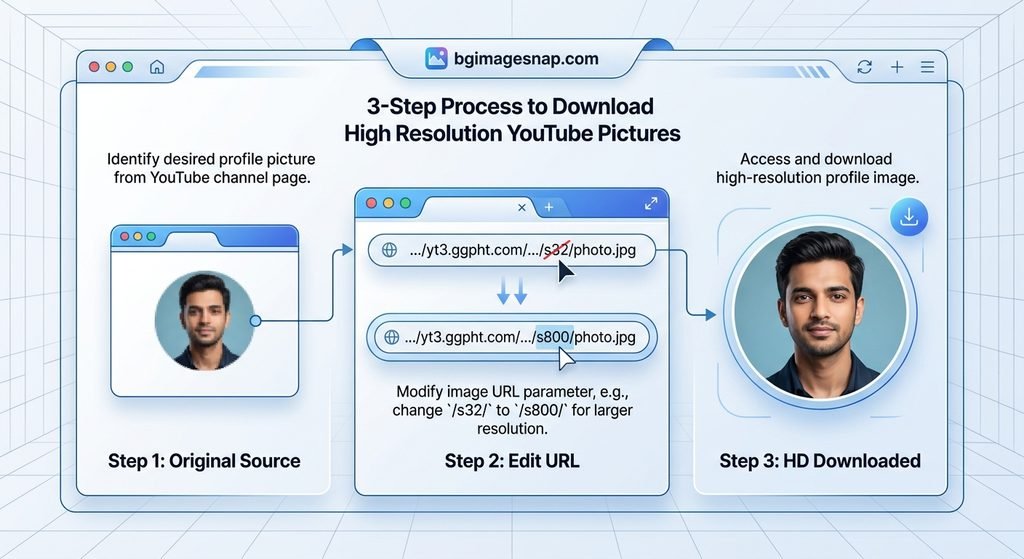
imgtag URL and open it in a new tab. You can often request a larger size by adjusting URL parameters. - Direct URL Adjustment: Some avatars use parameters like
/s32-c/or similar CDN sizing tags. Changing those identifiers to larger values (for example,/s128-c/or/s256-c/) can yield a bigger file. Results vary by source. - Trusted Browser Extensions: Some reputable extensions for Chrome or Firefox can capture media elements on a page. Use only extensions with high review counts and transparent privacy policies.
- Archive Services: Platforms like the Wayback Machine sometimes store older versions of profile pictures at higher resolutions if they were previously indexed.
Remember a YouTube PFP Downloader does not mean you need a dedicated app. Often the easiest path is a clean web tool with no ads.
Is It Safe? Legal and Privacy Notes
Safety depends on your source. Avoid suspicious downloaders that prompt you to install unknown executables or grant camera access.
From a legal standpoint profile pictures are usually copyrighted by the creator. Downloading for personal use typically falls under fair use in many jurisdictions but distributing altering for merch or using in commercial campaigns requires permission. YouTube’s Terms of Service also prohibit scraping content at scale.
For individual non commercial retrieval the risk is generally low but always credit creators when appropriate. If you need legal high resolution visuals for backgrounds or design work explore our HD Background Collection at BG Image Snap for ready to use assets.
Common Mistakes to Avoid
- Trusting pop up ads: Many “free downloader” pages push malware through fake download buttons. Close unexpected pop ups.
- Assuming private profiles are accessible: If a channel is private or unlisted the avatar URL may be inaccessible to public extractors.
- Ignoring resolution limits: Some profiles are uploaded at low resolution by design. No YouTube PFP Downloader can invent pixels that do not exist.
- Skipping copyright checks: Always verify whether your intended use requires a license.
Frequently Asked Questions About YouTube PFP Downloader
Q1: Is a YouTube PFP Downloader free?
Most web-based tools are free for single downloads. Some offer batch features or faster speeds through paid tiers.
Q2: What is the best resolution I can get?
It depends on what the creator uploaded. Common results range from 200px to 800px, though some high-quality uploads can exceed 1000px.
Q3: Do I need to install software?
No. Many reliable methods work entirely in your browser.
Q4: Can I download a YouTube profile picture for commercial use?
Only if you have permission from the rights holder. Downloading is not the same as licensing.
Q5: Why is the image blurry after download?
The source file may be small, or the site you used delivered a compressed copy. Use a YouTube PFP Downloader that explicitly offers a full-resolution option.
Q6: How do I find the direct profile picture URL?
Use your browser’s inspect tool on the avatar image element or paste the channel link into a reputable extractor.
Q7: Are these downloaders legal?
Using them for personal, non-commercial retrieval is generally acceptable. Systematic scraping or redistribution violates YouTube’s terms.
Q8: Can I use this for background images?
Yes, many users save YouTube avatars to use as phone or desktop backgrounds though you should ensure personal-use compliance.
Final Thoughts
A YouTube PFP Downloader is a practical way to preserve high quality profile images when YouTube’s interface limits direct saving. By combining browser based extractors with a basic understanding of image URLs you can get sharp results without risking your device.
If you are looking for more high quality visuals to pair with your download visit BG Image Snap for curated HD backgrounds wallpapers and digital assets designed for creators and enthusiasts.
Create Better Images in Seconds → Try BGImageSnap
Looking for more helpful image editing tips? Explore our latest guides and learn how to resize, convert, remove backgrounds and improve your photos. → click here