Introduction
You want to add wings to a photo. Maybe for a fantasy post, a logo, a social media graphic, or a creative project. You search for “wing PNG.” You download one. But when you place it over your image there’s a white box around it. The wings don’t blend. They look fake. This happens because the file isn’t truly transparent. A real Wing PNG has no background. It’s just the wings clean, sharp, and ready to layer over any color, texture, or scene.
This guide shows you exactly how to find, download, and use real transparent wing PNGs. No white borders. No guesswork. Just results.
Quick Answer: What Is a Wing PNG?
Short answer:
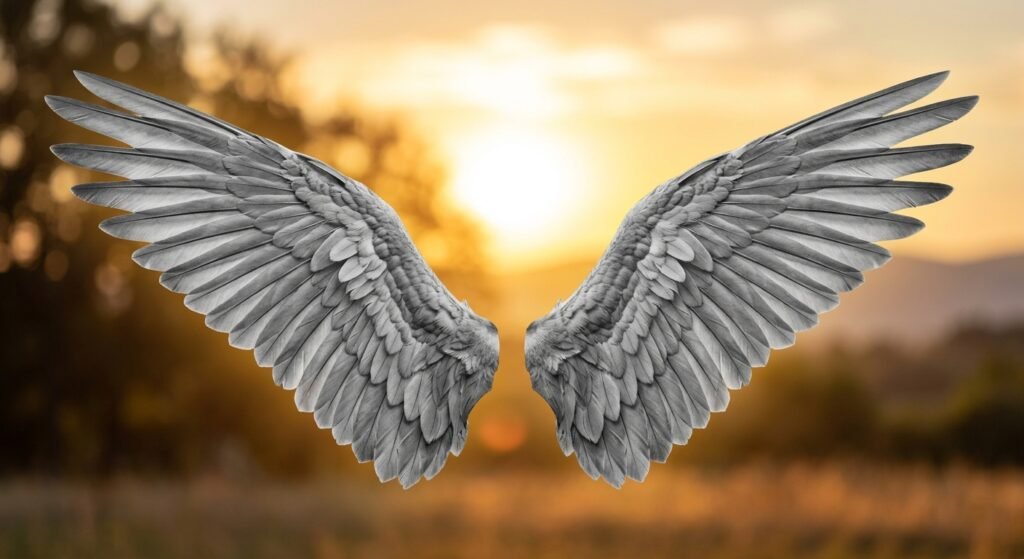
A Wing PNG is a transparent image file of wings angel, demon, bird, or fantasy with no background. The PNG format keeps the edges clean so the wings blend naturally over any color or photo.
Key Takeaways:
✅ PNG files support transparency no white or colored background
✅ Perfect for overlays on photos, posters, logos, and social media
✅ Works in Canva, Photoshop, PowerPoint, and most design apps
✅ Avoid JPG files they always have a solid background
✅ Always check the file preview before downloading
💡 A true Wing PNG shows only the wings. Everything else is invisible.
Why Use a Wing PNG Instead of JPG or JPEG
JPG files are great for photos. But they can’t do one thing: transparency.
| Feature | Wing PNG | Wing JPG |
|---|---|---|
| Background | Transparent | Solid white or colored |
| Edges | Clean, sharp | Hard, boxy border |
| Layering | Blends with any background | Looks pasted on |
| Use Cases | Design, social media, logos | Only for simple display |
| Editing | Easy to resize and reposition | Hard to remove background |
If you want wings to look like they belong not stuck on use PNG.
Where to Find Real Transparent Wing PNGs
Not all “free wing PNGs” are real. Many are JPGs renamed as PNG. Here’s how to find the real ones.
1. Use Trusted Free Sites
Try these for verified transparent files:
- Pixabay — Filter by “PNG” and “Transparent”
- PngTree — Search “angel wing transparent”
- Freepik — Use the “Transparent” filter (free account required)
Always preview the image before downloading. If you see a white square behind the wings, skip it.
2. Avoid Generic Search Results
Google searches often lead to low-quality sites that bundle PNGs with ads or require email signups. Stick to well-known sources.
3. Use BGImageSnap for Instant Access
We offer a collection of high-quality Wing PNGs all transparent, no watermarks, free to download.
No login. No registration. Just download and use.
How to Use a Wing PNG in Design Tools
Once you have a real Wing PNG, here’s how to use it.
In Canva (Free & Easy)
- Open a new design
- Click “Uploads” on the left
- Drag your Wing PNG into the editor
- Click and drag the wing onto your photo
- Resize with the corners don’t stretch
- Use the “Background Remover” tool if needed
- Download as PNG or JPG
In Photoshop
- Open your base image
- Go to File > Place Embedded
- Select your Wing PNG
- Press Enter to place it
- Use the Move Tool to position it
- Adjust opacity if needed
- Save as PNG to keep transparency
On Your Phone
- Open a photo in Snapseed or PicsArt
- Tap “Overlay” or “Add Image”
- Import your Wing PNG
- Resize and move it
- Tap “Export” and choose PNG
✅ Tip: Place wings behind hair or shoulders for a natural look. Avoid placing them over busy areas like faces or text.
Common Mistakes When Using Wing PNGs
Mistake #1: Using a JPG Instead of PNG
You think “it’s called PNG” but it’s not. Always open the file first. If you see a white box, it’s not transparent.
Mistake #2: Stretching the Image
Wings look fake if you drag the corner to make them wider or taller. Always resize proportionally.
Mistake #3: Placing Wings Too Close to the Head
Wings should look like they’re growing from the back not floating above the head. Leave space.
Mistake #4: Ignoring Lighting
If your photo is bright and the wings are dark, they won’t blend. Use a subtle shadow or color adjustment to match tone.
Mistake #5: Saving as JPG After Use
If you save your final design as JPG, the transparent background turns white. Always save as PNG if you want to reuse it.
How to Make Your Own Wing PNG (Simple Method)
You don’t need Photoshop. Here’s how to turn any wing image into a transparent PNG in minutes.
Step 1: Find a Wing Image
Search for “angel wing” or “bird wing” in high resolution. Use a photo with clear edges.
Step 2: Upload to BGImageSnap
Go to https://bgimagesnap.com/remove-background
Upload your image.
Step 3: Remove the Background
Click “Remove Background.” The tool will detect the wings and erase the rest.
Step 4: Download as PNG
Click “Download.” You now have a clean, transparent Wing PNG.
This takes less than 30 seconds. No skill needed.
FAQ: Your Top Wing PNG Questions Answered
1. What is a Wing PNG?
It’s a transparent image of wings no background. Used for overlays in design.
2. Can I use Wing PNGs for commercial projects?
Yes if the source allows it. Always check the license. Most free PNGs from Pixabay and BGImageSnap are free for commercial use.
3. Why do my wings look pixelated?
The original image was low resolution. Always use files at least 1000 pixels wide.
4. Can I change the color of a Wing PNG?
Yes. In Canva or Photoshop, use the “Color” or “Hue” tool to tint the wings.
5. Do Wing PNGs work on Instagram and TikTok?
Yes. Upload your design as a PNG to keep transparency. Use them in stories, posts, or profile banners.
6. Is it legal to use Wing PNGs in logos?
Yes — if you own the rights or the file is labeled for commercial use. Never claim someone else’s design as your own.
7. Why does my Wing PNG have a halo around it?
This happens when the background wasn’t removed cleanly. Use a better tool or try again with a clearer original image.
8. Can I use Wing PNGs for print?
Yes — as long as the file is high resolution (300 DPI or higher). For posters or flyers, use 3000+ pixel files.
Conclusion
A good Wing PNG doesn’t scream “I’m an overlay.”
It whispers like it was always there. You don’t need to be a designer. You don’t need fancy tools.
You just need a real transparent file and the know-how to place it right. Whether you’re making a fantasy post, a logo, or a personal project, the right Wing PNG makes all the difference.
Don’t waste time on white-boxed JPGs.
Find the real thing.
Use it well.