You filmed the perfect Reel but Instagram cropped off your text squished your video or turned it blurry after upload. Almost every Reel problem comes down to using the wrong Instagram Reel size before posting. In this guide you’ll learn every Instagram Reel size and dimension in pixels from the video itself to covers and safe zones plus free steps to format any clip perfectly.
Key Takeaways
- The ideal Instagram Reel size is 1080 × 1920 pixels with a 9:16 vertical aspect ratio.
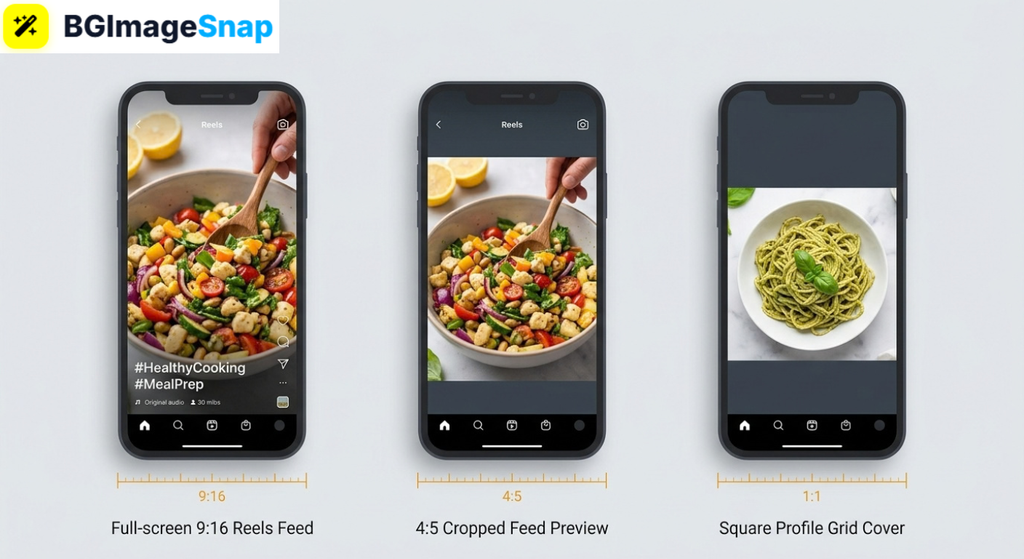
- Reels display in your feed cropped to 4:5 so keep key content inside the central safe zone.
- The Reel cover photo is also 1080 × 1920 pixels but your profile grid crops it to a square.
- Instagram compresses uploads heavily starting at full 1080p keeps quality intact.
- Free tools at bgimagesnap help you size Reel covers and thumbnails perfectly before posting.
What Is the Instagram Reel Size and Why Does It Matter?
The Instagram Reel size is 1080 pixels wide by 1920 pixels tall a vertical rectangle with a 9:16 aspect ratio. This fills the entire phone screen in the Reels feed which is exactly how Instagram designed the format to be watched.
Why does this matter so much? Instagram resizes and compresses every video you upload. If your clip doesn’t match the recommended dimensions the platform crops stretches or letterboxes it automatically and its choices rarely match yours.
A horizontal video uploaded as a Reel gets shrunk into a small box with giant empty bars above and below. A video with text near the edges gets its captions covered by Instagram’s buttons username and description overlays.
Quality is the other half of the equation. Instagram applies aggressive video compression to save bandwidth. Starting with a crisp correctly sized 1080 × 1920 file means your Reel survives that compression looking sharp instead of muddy.
Getting the Instagram Reel size right takes minutes and it protects everything you worked to create framing text and image quality.
Every Instagram Reel Size and Dimension You Need to Know
Here’s a complete breakdown of every Instagram Reel size in pixels from the video itself to covers safe zones and technical limits. Save this list for every future upload.
Reel Video Dimensions
- Recommended size: 1080 × 1920 pixels
- Aspect ratio: 9:16 (full vertical)
- Minimum resolution: 720 pixels wide anything lower looks blurry
- Orientation: Vertical only; horizontal videos get boxed with empty bars
Reel Cover Photo Dimensions
- Recommended size: 1080 × 1920 pixels (same as the video)
- Profile grid crop: The cover displays as a square ish crop on your profile grid keep faces and titles centered
- Feed crop: In the main feed covers and videos preview at 4:5 (1080 × 1350 pixels)
- Pro tip: Design covers at full size then check the center square looks great on its own
Safe Zones (Where NOT to Put Text)
- Top zone: Avoid the top ~250 pixels the camera icon and “Reels” header sit there
- Bottom zone: Avoid the bottom ~420 pixels your username caption and audio title cover it
- Right edge: Avoid ~120 pixels along the right side like, comment and share buttons live there
- Safe rule: Keep all text and logos within the central 1080 × 1420 pixel area
Technical Requirements
- File formats: MP4 is the safest choice; MOV also works
- File size limit: Up to 4 GB for most uploads
- Frame rate: 30 fps is the standard; 60 fps works but gets compressed more
- Reel length: Up to 90 seconds for most accounts
- Bitrate: Higher is better before upload let Instagram handle the compression itself
Two insights from this list matter most. First the Instagram Reel size never changes but the visible area does the same video displays full screen in Reels cropped to 4:5 in the feed and square cropped on your profile grid.
Second those safe zones trip up even experienced creators. Perfect captions mean nothing if the like button sits on top of them. Design for the center and your Reel works everywhere it appears.
How to Format Your Video to Instagram Reel Size Step by Step
Getting any clip ready for Reels takes just a few minutes. Follow these five steps:
- Film vertically whenever possible. Hold your phone upright so your footage is natively 9:16. Vertical filming uses your camera’s full sensor and needs zero cropping later.
- Edit your video in a 1080 × 1920 canvas. Most free editing apps offer a “9:16 Reels” or “TikTok” preset. Import your footage and the app frames it to the correct Instagram Reel size automatically.
- Position text inside the safe zone. Place captions, stickers, and logos in the center of the frame away from the top 250 pixels, bottom 420 pixels, and right edge where Instagram’s interface sits.
- Design a custom cover image. Create a 1080 × 1920 cover with your title centered. Use the free tools at bgimagesnap to remove backgrounds, crop images, and build eye catching covers in your browser.
- Export and upload at full quality. Save your video as MP4 at 1080 × 1920 then upload over a strong connection. Weak Wi-Fi can trigger Instagram’s most aggressive compression so upload when your signal is solid.
That’s the complete workflow from raw clip to perfectly formatted Reel in under ten minutes.
Who Needs the Right Instagram Reel Size? Real Use Cases
Correct dimensions pay off for anyone posting vertical video. Here are four groups who rely on them daily:
Small business owners and sellers. A boutique owner’s product Reel is often a customer’s first impression of the shop. Properly sized videos with visible prices and clean framing look professional, while cropped, blurry clips quietly cost sales.
Content creators and influencers. Creators live and die by watch time, and the algorithm favors content that fills the screen. A creator whose text gets hidden behind Instagram’s buttons loses viewers mid sentence safe zone awareness is literally an engagement strategy.
Freelance videographers and editors. Clients expect deliverables that work perfectly on every platform. Editors who deliver files at the exact Instagram Reel size save clients from upload surprises and build reputations for platform ready work.
Students and casual creators. Even everyday posters feel the difference. A graduation or concert clip shared at full 1080 × 1920 fills friends’ screens beautifully, while a letterboxed horizontal video looks like an afterthought.
Tips for Better Looking Instagram Reels
- Always upload at 1080 × 1920, never smaller. Instagram compresses everything, so starting below full resolution guarantees a soft, blurry result.
- Check your Reel in feed view before posting. The 4:5 feed crop cuts off the top and bottom of your video. Preview how the cropped version looks, not just the full screen one.
- Center your cover’s key elements. Your profile grid shows only the middle square of your cover. Faces, titles, and products must survive that crop.
- Enable high quality uploads. In Instagram’s settings, turn on “Upload at highest quality” under Data Usage this one toggle protects your video from extra compression.
- Keep important text away from edges. When in doubt, nudge captions toward the center. Ten pixels of margin is the difference between readable and hidden.
- Match your cover style across Reels. Consistent cover designs make your profile grid look branded and intentional, which builds follower trust.
- Design covers separately from video frames. A custom cover built at bgimagesnap with bold text and clean graphics outperforms a random paused frame every time.
FAQs
What is the Instagram Reel size in pixels?
The recommended Instagram Reel size is 1080 × 1920 pixels with a 9:16 vertical aspect ratio. This fills the entire phone screen in the Reels feed without cropping or black bars.
Why does Instagram crop my Reel in the feed?
The main feed displays videos at 4:5 (1080 × 1350 pixels) which trims the top and bottom of your 9:16 Reel. Viewers can tap to watch full screen, but keep key content centered so the cropped preview still works.
What size is an Instagram Reel cover photo?
Covers should be 1080 × 1920 pixels same as the video. However your profile grid displays only the center portion as a square so keep titles and faces in the middle of the design.
Why do my Reels look blurry after uploading?
Blurriness usually comes from uploading below 1080p, weak internet during upload, or Instagram’s compression. Upload a full resolution MP4 over strong Wi-Fi with “highest quality” uploads enabled in settings.
Can I post a horizontal video as a Reel?
You can, but Instagram shrinks it into a small box with empty space above and below. For horizontal footage, resize or crop it to 9:16 first or add a styled background to fill the vertical frame.
Conclusion
The Instagram Reel size of 1080 × 1920 pixels is the foundation of every sharp, professional looking Reel and now you know the covers, crops, and safe zones that surround it. Format your videos correctly, and Instagram’s compression stops being your enemy. Need a scroll stopping cover for your next Reel? Visit bgimagesnap to crop, resize, and polish your images with free browser based tools!