A 1920×1080 image is the standard resolution for full HD backgrounds and finding a direct image link for this format is one of the most common frustrations for designers developers and content creators. Many sites wrap images in preview pages temporary session IDs or compressed thumbnails that never load properly.
This guide answers exactly how to get a direct image link for a 1920×1080 image whether you need it for a website hero section a video backdrop or a desktop wallpaper. You will learn practical methods that work today plus how to avoid broken links after you publish.
What you will learn:
- The exact steps to grab direct URLs for 1920×1080 images
- Why some “direct links” break after a few hours
- How to self host so your link never dies
- Where BGImageSnap fits into your workflow for dependable direct links
Table of Contents
Quick Answer / Key Takeaways
- A 1920×1080 image is Full HD at a 16:9 ratio.
- Use “Copy image address” in your browser for quick direct links.
- Source URL parameters (like
?w=1920) can unlock a direct 1920×1080 image file. - Self hosting after download prevents broken links.
- BGImageSnap offers direct download URLs for its 1920×1080 image library.
What Is a 1920×1080 image?
A 1920×1080 image has a width of 1920 pixels and a height of 1080 pixels. That makes it the standard resolution for 1080p displays projectors and most modern desktop screens. The aspect ratio is 16:9.
Because of its size a 1920×1080 image delivers enough detail for full screen backgrounds without forcing users to wait for massive file transfers. If you are building a website hero banner a YouTube thumbnail or a presentation slide this resolution is usually the sweet spot.
Common Use Cases
Web design backgrounds video overlays digital signage presentation slides and desktop wallpapers all rely on this format. When you link directly to a 1920×1080 image file the browser loads only that asset not an entire gallery page.
How to Get a Direct Image Link for a 1920×1080 Image
This is the core question. Below are five practical methods to grab a working direct URL.
Answer first: Most direct links come from either the browser’s native image copy function a modified source URL or a direct download library like BGImageSnap. The best method depends on whether you need the image for a single project or ongoing use.
Method 1 Right Click and Copy Image Address
Open the page with the image. Right click the photo and select “Copy image address” (Chrome/Edge) or “Copy Image Location” (Firefox). Paste the URL into your code or CMS.
If the URL ends in .jpg, .png, or .webp, it is likely direct. If it points to an HTML page or a CDN with query strings that block hotlinking test it in a new tab first.
Method 2 Modify the Source URL for Direct Access
Many platforms store originals at different resolutions. For example Unsplash allows you to adjust width parameters in the URL. Instead of a generic preview link add ?w=1920&q=80 to the source path. This can return a direct 1920×1080 image file instead of a compressed preview.
Always verify by opening the URL in an incognito window. You can also check the “Open image in new tab” option on platforms like Pexels and Pixabay. If the new tab shows only the image with no text you have a direct link.
For more on open source image resources see the Unsplash Source API and Pexels direct URLs.
Method 3 Use BGImageSnap Direct Links
At BGImageSnap the 1920×1080 image collection is built for direct use. Each file includes a clean URL that serves the image directly to your site or project. You skip the preview page avoid temporary session IDs and get consistent dimensions.
If you need a reliable source for backgrounds this approach removes the guesswork. Browse our full library of direct background images for more options.
Method 4 Browser Developer Tools
For tricky sites open the browser’s developer tools (F12) go to the Network tab and filter by Img. Reload the page. Find the image request that returns the largest file size often the 1920×1080 original. Right click the request URL and copy it.
This is especially useful when the visible thumbnail links to a different asset or when the site uses a lazy load script.
Method 5 Download and Self Host
Download the 1920×1080 image to your computer then upload it to your own server or content delivery network (CDN). This gives you a permanent direct link you control.
For commercial projects this is the most professional option because it eliminates dependency on third party hosts that can change or remove files.
For help with file hosting see our guide to direct image hosting tips.
Direct Link vs. Preview Page: What’s the Difference?
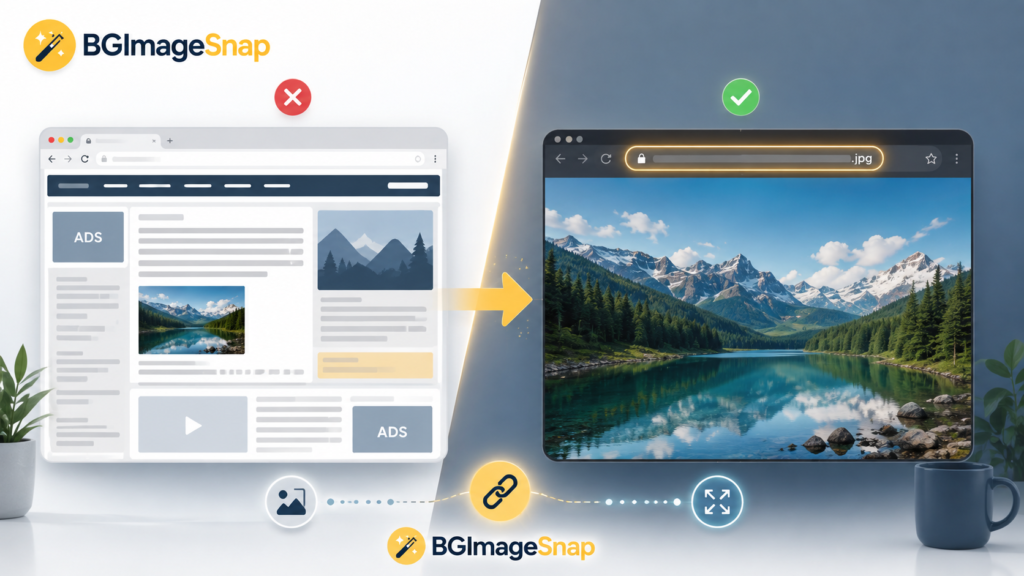
A direct link ends in an image file extension and renders only the image. A preview page loads HTML, navigation, ads, and scripts around the photo.
If you embed a preview URL into your website users see broken layout or unwanted branding. If you use a direct 1920×1080 image link the asset loads cleanly in your design.
Before publishing open your URL in a private window to confirm it produces nothing but the image. If you see a page with menus and text you are not using a direct link.
Mistakes to Avoid with 1920×1080 Images
- Using a thumbnail link instead of the full size file. Check pixel dimensions before embedding.
- Hotlinking without checking terms. Some sites block direct embedding; others require attribution.
- Relying on temporary CDN URLs that expire after a session. Always test after 24 hours.
- Ignoring file size. A 1920×1080 image JPEG can range from 300 KB to 3 MB. Optimize with tools like TinyPNG or Squoosh if speed is critical.
Best Use Cases for Direct 1920×1080 Image Links
Direct links work best for website backgrounds video production templates, e-learning modules digital presentations and social media ads. Because the format is standard a direct URL will scale correctly across desktop and tablet layouts if applied with responsive CSS.
If you are looking for quick high resolution assets explore our free HD wallpaper downloads to supplement your project.

FAQs
What does 1920×1080 mean?
It is Full HD resolution: 1920 pixels wide by 1080 pixels tall displayed in a 16:9 widescreen ratio.
How do I know if a link is direct?
Open it in a new tab. If you see only the image and a URL ending in .jpg/.png/.webp, it is direct.
Can I use a direct 1920×1080 image link for commercial work?
Only if the source allows commercial use. Always verify the license. Self hosted downloads from your own library are safest.
Why does my direct link break?
Third party hosts may change paths delete source files or block hotlinking. Self hosting prevents this.
Is 1920×1080 the same as 1080p?
Yes. 1080p describes progressive scan; 1920×1080 describes the pixel grid.
How do I get a direct image link for a 1920×1080 image from Unsplash?
Add ?w=1920&q=80 to the source URL or use the “Download” button and host the file yourself for guaranteed access.
What is the best format for a direct 1920×1080 image?
JPEG offers the smallest file size for photos. PNG is better for graphics with sharp text. WebP is ideal for web speed.
Does BGImageSnap provide direct links?
Yes. Our 1920×1080 image library includes direct download URLs designed for embedding and background use.
Conclusion
Getting a direct link for a 1920×1080 image does not require advanced technical skills just the right steps. Whether you use browser tools, URL tricks, or a dedicated library like BGImageSnap the goal is the same: a reliable image URL that loads fast and stays available.
If you want a curated library of direct 1920×1080 image files for your next project browse BGImageSnap today.